

- Published on
The Newest AI Browser Assistants in 2026: How They Supercharge Productivity
Listen to the full article:
- Authors

- Name
- Jagadish V Gaikwad
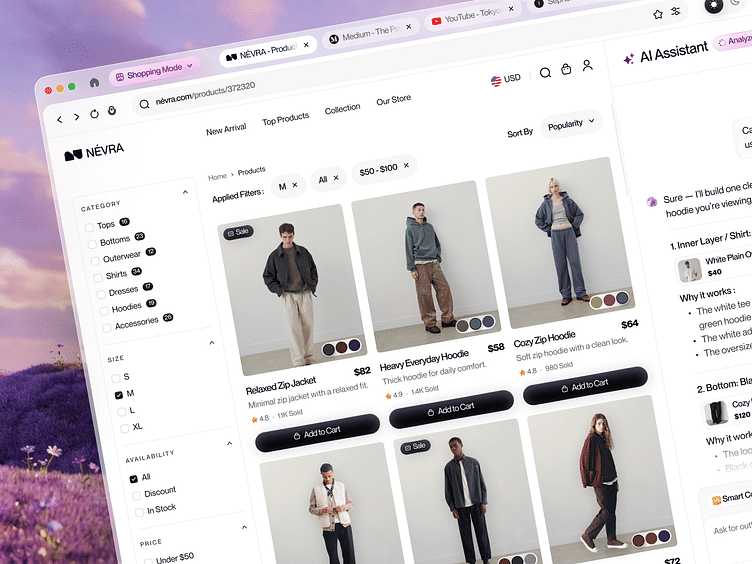
The newest AI browser assistants in 2026, such as Perplexity Comet and ChatGPT Atlas, have transformed from simple chat overlays into fully autonomous agents that automate research, manage tabs, and execute multi-step workflows, effectively supercharging productivity for digital workers by eliminating hours of manual browsing.
If you’ve ever felt like your browser is just a library of links you have to manually navigate, you’re about to change your mind. The web is no longer just a place you visit; it’s a place your browser does things for you. We’re living in the era of the agentic web, where your browser doesn’t just show you content—it understands it, acts on it, and completes tasks without you lifting a finger.
From Google’s Auto Browse feature powered by Gemini 3 to Perplexity’s task-oriented Comet browser, these tools are rewriting the rules of how we work online. Let’s dive into the newest AI browser assistants, how they work, and why they’re the ultimate productivity hack for 2026.
The Shift from Smart Assistants to AI Agents
Before we get into the specific tools, it’s crucial to understand the shift happening right now. In the past, AI in browsers was mostly about smart assistants. These tools added chat and analysis features, but you still controlled the browsing. You had to click the links, open the tabs, and type the queries. Examples like Brave Leo, Microsoft Edge Copilot, and ChatGPT Atlas sidebar fit this category. They were helpful, but they weren’t autonomous.
Today, we’ve crossed the line into AI agents. These browsers browse autonomously, make decisions, and complete tasks without constant guidance. They understand your intent and execute workflows based on your instructions.
Here’s a quick breakdown of the two categories:
| Feature | Smart Assistants | AI Agents |
|---|---|---|
| Control | You control the browsing | Browser acts autonomously |
| Task Execution | Requires manual clicks | Completes tasks automatically |
| Examples | Brave Leo, Edge Copilot | Perplexity Comet, Chrome Auto Browse |
| Productivity Impact | Moderate (faster queries) | High (automates workflows) |
The difference is massive. With a smart assistant, you might save 5 minutes on a search. With an AI agent, you might save 2 hours on a research project because the browser did the work for you.
Perplexity Comet: The Task-Oriented Powerhouse
Perplexity Comet is arguably the most exciting new browser assistant in 2026. Released in July 2025, it’s designed as a hands-on digital assistant that automates research, tab management, and scheduling. It’s not just a browser; it’s a task-oriented engine that treats the web less like a library and more like an interview.
What makes Comet stand out is its agentic capabilities. It can actually click, scroll, and fill forms out for you. Imagine asking your browser to “find the best flight to Tokyo under $800, compare three options, and book the cheapest one.” Comet doesn’t just show you links; it navigates the sites, compares the prices, and completes the booking.
Comet is also free for its agent mode, which no other browser offers on the free tier. This includes Perplexity’s built-in AI, the assistant, and the agent mode. It combines real-time web access with AI features to assist users with research, content creation, and tab management. With Comet, you can summarize an article, compare products, or pull key takeaways directly from the page you’re on.
For people who want to automate the boring stuff, Comet is the extension for people who want to automate the boring stuff. It combines ChatGPT, Gemini, Claude, Perplexity, and DeepSeek with real browser automation. You can navigate websites, click buttons, and monitor pages for changes.
ChatGPT Atlas: Native Integration for ChatGPT Users
ChatGPT Atlas is OpenAI’s answer to the agentic web. OpenAI finally stopped relying on plugins and built their own browser, Atlas, released on macOS in late 2025 and finally on Windows in early 2026. It features native ChatGPT integration with memory and agent automation inside a standalone browser.
Atlas is designed for ChatGPT users who want a seamless experience. It doesn’t just add a sidebar; it integrates ChatGPT directly into the browser’s core. This means your AI assistant has memory of your past interactions and can use that context to provide better assistance.
The agent mode in Atlas allows it to perform multi-platform tasks, research, and desktop integration via natural language. You can summarize a document, draft an email, or find a discount, all without leaving the page. It’s not full agentic control like Comet, but it’s a smart middle ground. Quick, focused actions that make everyday tasks faster.
For people who want to customize their AI workflows, Dia is the best AI browser for people who want to customize their AI workflows. Dia is an assistant-focused browser by Arc’s team, offering inline AI help for writing, research, and planning with local privacy controls.
Google Chrome Auto Browse: The OEM Giant’s Move
Google’s biggest move came in January 2026, with Chrome Auto Browse. Powered by Gemini 3, this feature turns Chrome into an autonomous agent that can scroll, click, type, and navigate on your behalf. This is a massive shift for the world’s most popular browser.
On May 12, 2026, Google went further and announced that Auto Browse is coming to Android at the operating-system level. The agent ships baked into Android rather than as a downloadable app or browser extension, reaching Pixel 10 and Galaxy S26 first in late June 2026 and expanding to a stated 200 million devices by the end of the year.
This means your browser is now a powerful, proactive assistant for everyday users. With Gemini in Chrome on desktop, iOS, and now Android, you’re getting powerful new ways to browse, create, and get things done. From automating complex, multi-step tasks with Auto Browse to intuitive multimodal interactions using your cursor or voice, Gemini in Chrome puts powerful productivity directly at the user’s fingertips.
Coming in June, Google designed Gemini in Chrome on Android to be your personal browsing assistant, helping you better understand content on the web. It lets you summarize long articles, ask specific questions, and get detailed explanations without having to switch apps. Beyond answering questions, it acts as a versatile productivity tool that connects with Google apps like Calendar, Keep, and Gmail to help you complete tasks quickly.
Microsoft Edge Copilot Mode: Multi-Tab Context Awareness
Microsoft launched Copilot Mode for Edge in July 2025. The feature differentiates itself with multi-tab context awareness. Copilot can see all your open tabs, understanding the full context of what you’re researching to provide better assistance.
Copilot Mode in Microsoft Edge is an experimental browsing experience intended to turn the web browser into a more intelligent, proactive assistant. Built directly into Edge, Copilot Mode blends AI capabilities with Microsoft’s browser to help users browse smarter. It introduces tools for summarizing pages, generating content, navigating websites, and performing contextual actions.
With Copilot, you can generate text and images, control browser tabs with commands, and interact with webpages directly without needing to switch apps or log in. It’s a conversational tool, not an autonomous agent, but it’s a smart middle ground.
Opera Aria: The Free Assistant for Everyday Use
Opera Aria is a free AI assistant to enhance browsing in the Opera browser on desktop and mobile. It blends real-time web access with AI features to assist users with research, content creation, and tab management.
With Aria, users can generate text and images, control browser tabs with commands, and interact with webpages directly without needing to switch apps or log in. It’s a free AI assistant to enhance browsing in the Opera browser on desktop and mobile.
Opera upgraded its built-in AI in October 2025, but the focus remains on assistance rather than automation. You can chat with pages and get summaries, but Opera doesn’t offer the autonomous browsing capabilities of competitors. The AI features are free.
How These Assistants Improve Productivity
The productivity gains from these AI browser assistants are not just incremental; they’re transformative. Here’s how they improve your workflow:
- Automated Research: Instead of manually opening 10 tabs and reading through articles, an AI agent can summarize the key points, compare products, and pull out the most relevant data in seconds.
- Tab Management: AI assistants can automatically organize your tabs, close unused ones, and group related content, keeping your workspace clean and focused.
- Form Filling & Booking: From booking flights to filling out complex forms, AI agents can handle these tasks automatically, saving you hours of manual work.
- Content Creation: Many assistants can draft emails, write social posts, or generate images directly from the browser, streamlining your content creation process.
- Contextual Awareness: With multi-tab context awareness, AI assistants understand the full scope of your research, providing more accurate and relevant assistance.
The Future of the Agentic Web
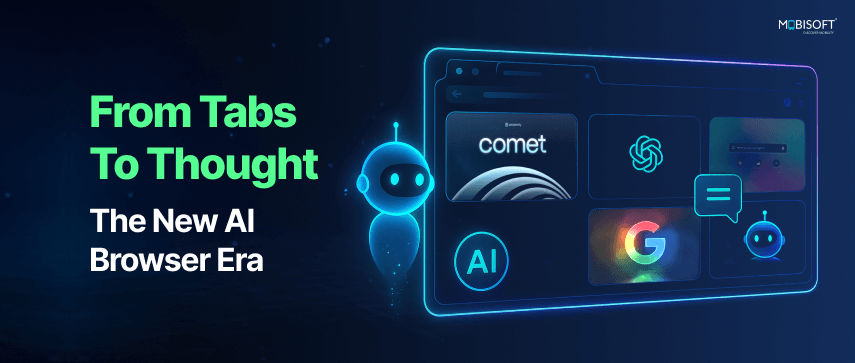
The agentic web is just getting started. By integrating efficient, built-in AI models directly to the browser and bringing powerful automation tools like Auto Browse to Chrome, we’re making using the web smarter, faster, and more accessible for everyone.
With Skills in Chrome, you can save and reuse your most helpful AI prompts in Gemini in Chrome on desktop. You can now use your mouse pointer to ask Gemini in Chrome about the specific parts of the webpage you are looking at, saving you from having to describe exactly what you mean.
On desktop, we will be integrating Auto Browse with Gemini Spark in the coming months, so that your 24/7 personal AI agent can take actions in the browser on your behalf.
The era of Search agents is where you can easily create, customize, and manage multiple AI agents for your many tasks, right in Search. We’re starting with information agents. Operating in the background, 24/7, these agents intelligently reason across information to find exactly what you need at exactly the right moment.
Which AI Browser Assistant Should You Choose?
Choosing the right AI browser assistant depends on your specific needs. Here’s a quick guide:
- For Automation & Research: Perplexity Comet is the best choice. Its agentic capabilities and free agent mode make it perfect for automating complex workflows.
- For ChatGPT Users: ChatGPT Atlas offers native integration and memory, making it ideal for those who already use ChatGPT.
- For Everyday Use & Google Integration: Google Chrome Auto Browse is the best option, especially if you’re on Android and want seamless integration with Google apps.
- For Multi-Tab Context: Microsoft Edge Copilot Mode is great for researchers who need to keep track of multiple tabs.
- For Customization: Dia is the best for people who want to customize their AI workflows.
Final Thoughts
The newest AI browser assistants in 2026 are not just tools; they’re partners in your productivity journey. From Perplexity Comet to Chrome Auto Browse, these agents are automating the boring stuff, freeing you up to focus on what really matters.
The web is no longer just a place you visit; it’s a place your browser does things for you. And with these tools, you’re getting powerful productivity directly at your fingertips.
So, which AI browser assistant are you going to try first? Are you ready to let your browser do the work for you? Share your thoughts in the comments and let’s discuss how these tools are changing the way we work.
You may also like
- AI-Powered Search Engines vs Traditional Web Search: The 2026 Battle for Information
- AI Integration Strategies for Existing SaaS Businesses: A Practical Guide for 2025
- Best Cloud Platforms for Hosting SaaS Applications in 2025: A Complete Guide
- Why Are People Hating GPT-5? Understanding the Backlash
- Machine Learning-Powered SaaS for User Feedback Analysis: The Future of Product Insights