

- Published on
Vector Databases Explained in Simple Terms: The AI Backbone You Need to Know
Listen to the full article:
- Authors

- Name
- Jagadish V Gaikwad
If you’ve been diving into AI lately, you’ve probably heard the term vector database thrown around like it’s the secret sauce behind every smart app. But what actually is it? And why do we need a whole new type of database just for AI?
Let’s break it down in simple terms—no math degree required.
What Is a Vector Database? (The 30-Second Answer)
A vector database is a specialized database designed to store, index, and search data represented as vectors—arrays of numbers that capture the meaning or essence of text, images, audio, or other unstructured data .
Unlike traditional databases that look for exact matches (like “find me the user with ID 123”), vector databases find similar items based on how close their vectors are in a multi-dimensional space .
Think of it like this: instead of searching by keyword, you’re searching by concept. If you ask, “What movies are like Inception?” a vector database can find films with similar themes, even if they don’t share the same words.
Why Do We Need Vector Databases?
Traditional databases are great for structured data—think customer names, order IDs, or product prices. But they struggle with unstructured data: long articles, images, videos, or chat messages where the meaning matters more than the exact words .
Here’s the problem AI faces:
| Traditional Database | Vector Database |
|---|---|
| Searches by exact match (e.g., “Apple” = fruit) | Searches by semantic similarity (e.g., “Apple” ≈ “iPhone” in tech context) |
| Uses rows and columns | Uses high-dimensional vectors |
| Good for structured data | Built for unstructured data |
| Slow at finding “similar” items | Fast at similarity search |
AI models don’t understand words—they understand numbers. When you feed text into an AI, it gets converted into a vector embedding, a list of numbers that represents the meaning of that text .
For example:
- The word “cat” might become:
[0.8, -0.3, 0.9, ...] - The word “dog” might become:
[0.7, -0.2, 0.85, ...]
These vectors are close together because cats and dogs are semantically similar. But “car” might be: [0.1, 0.9, -0.4, ...]—far away in vector space .
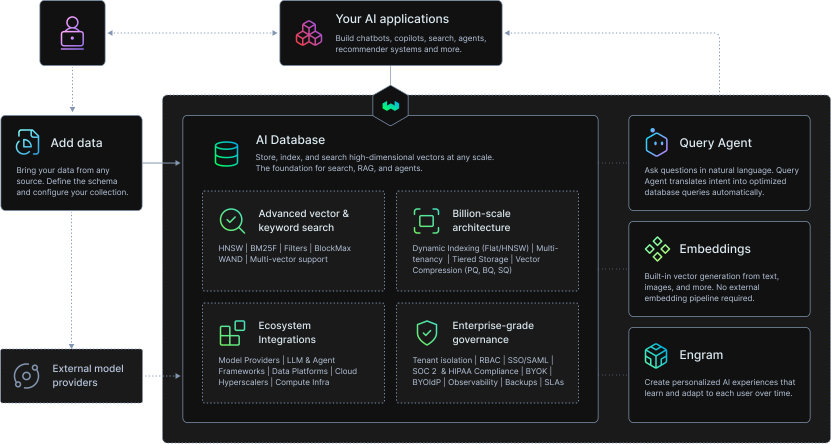
A vector database stores these embeddings and lets you quickly find the nearest neighbors—the most similar items .
How Does a Vector Database Work? (Simple Breakdown)
A vector database does two main things:
- Stores vector embeddings – Keeps your data as numerical vectors
- Indexes the vectors – Organizes them so searching is fast and efficient
Here’s the workflow:
Step 1: Convert Data to Vectors
You start with raw data (text, image, audio). An embedding model (like BERT, CLIP, or a custom LLM) converts it into a vector .
# Example: Text → Vector
text = "The best pizza in New York"
vector = embedding_model.encode(text)  # Returns: [0.72, -0.31, 0.89, ...]
Step 2: Store Vectors in the Database
The vector, along with metadata (title, URL, price) and a unique ID, gets saved .
{
  "id": "12345",
  "vector": [0.72, -0.31, 0.89, ...],
  "metadata": {
    "title": "Best Pizza in NYC",
    "url": "https://example.com/pizza",
    "price": "\$15"
  }
}
Step 3: Search for Similar Items
When you query, your input is also converted to a vector. The database finds vectors closest to yours using approximate nearest neighbor (ANN) algorithms .
Common algorithms:
- HNSW (Hierarchical Navigable Small World)
- IVF (Inverted File Index)
- k-NN (k-nearest neighbor)
These let you search millions of vectors in milliseconds .
Key Features of Vector Databases
Modern vector databases aren’t just about storing numbers. They come with production-ready features:
- CRUD operations: Create, read, update, delete vectors
- Metadata filtering: Search vectors and filter by tags, dates, categories
- Horizontal scaling: Handle billions of vectors across multiple servers
- Serverless options: Pay only for what you use (great for startups)
- Low-latency queries: Ideal for real-time AI apps
They also support multi-modal search—finding similar items across text, images, and audio in one query .
Types of Vector Databases
Not all vector databases are built the same. Here’s the split:
1. Native Vector Databases
Built from scratch for vectors. Optimized for speed, scale, and AI workloads.
Examples:
- Pinecone (cloud-native, serverless)
- Milvus (open-source, scalable)
- Qdrant (fast, Rust-based)
- Weaviate (open-source, hybrid search)
- ByMeta (newer, focused on metadata)
2. Traditional Databases with Vector Support
Regular databases that added vector features. Good if you already use them.
Examples:
- PostgreSQL (with PGVector extension)
- ElasticSearch (vector plugin)
- Redis (vector module)
Which should you choose?
| Use Case | Best Option |
|---|---|
| Building a new AI app from scratch | Native vector DB (Pinecone, Qdrant) |
| Already using PostgreSQL | PGVector (cheaper, simpler) |
| Need hybrid search (text + vectors) | Weaviate, ElasticSearch |
| Enterprise-scale, high throughput | Milvus, Qdrant |

Real-World Use Cases
Vector databases aren’t just for tech demos. They’re powering real AI applications today:
1. Semantic Search
Find content by meaning, not keywords. Example: “movies about time travel” finds Inception, Interstellar, even if they don’t say “time travel” .
2. Recommendation Engines
Netflix, Spotify, and Amazon use vector search to suggest similar content based on your history .
3. Retrieval-Augmented Generation (RAG)
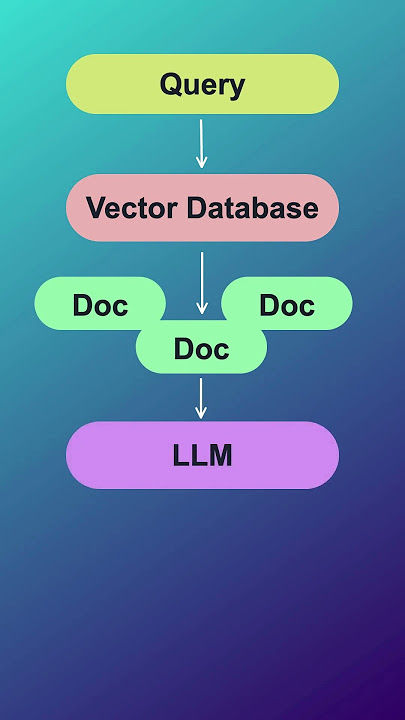
LLMs like ChatGPT use vector databases to fetch relevant context before answering. This makes them more accurate and less prone to hallucinations .
4. Multi-Modal Search
Search with an image and find similar images or text descriptions. Example: Upload a photo of a shoe and find where to buy it .
5. AI Memory
Give AI apps “long-term memory” by storing past conversations as vectors. The AI can recall what you said weeks ago .
6. Object Detection & Image Analysis
Find similar objects in images (e.g., “find all red cars”) using vector embeddings of visual features .
Vector Databases vs. Traditional Databases: The Big Difference
Let’s make this crystal clear:
| Aspect | Traditional Database | Vector Database |
|---|---|---|
| Data Type | Structured (rows/columns) | Unstructured (vectors) |
| Search Method | Exact match (SQL WHERE) | Similarity (nearest neighbor) |
| Query Speed | Fast for exact lookups | Fast for similarity search |
| AI Support | Limited | Built for AI/ML |
| Example Query | SELECT * FROM users WHERE id = 123 | Find vectors closest to [0.7, -0.3, ...] |
Traditional databases ask: “Is this exactly what I’m looking for?”
Vector databases ask: “What’s most similar to what I’m looking for?”
That’s why they’re essential for AI, where context and meaning matter more than exact matches.
Popular Vector Database Tools in 2026
If you’re building an AI app, here are the top tools to consider:
- Pinecone: Cloud-native, serverless, easiest to start with. Great for startups .
- Qdrant: Fast, open-source, Rust-based. Excellent for high-performance needs .
- Weaviate: Open-source, supports hybrid search (vectors + text). Good for complex queries .
- Milvus: Highly scalable, open-source. Ideal for enterprise-scale deployments .
- PGVector: PostgreSQL extension. Best if you already use Postgres .
- AWS OpenSearch: Recommended for Amazon Bedrock users .
Most offer free tiers or open-source versions, so you can test before committing.
How to Start Using a Vector Database (Quick Guide)
Want to try one? Here’s a 5-minute setup with Pinecone (one of the easiest):
# 1. Install Pinecone client
pip install pinecone-client

# 2. Connect to your account
import pinecone
pinecone.init(api_key="YOUR_KEY", environment="us-west1")

# 3. Create an index
pinecone.create_index("my-index", dimension=1536)

# 4. Upsert vectors
index = pinecone.Index("my-index")
index.upsert([
    ("id1", [0.72, -0.31, ...], {"title": "Pizza"}),
    ("id2", [0.68, -0.29, ...], {"title": "Burger"})
])

# 5. Query for similar items
results = index.query(
    vector=[0.70, -0.30, ...],
    top_k=2,
    include_metadata=True
)
That’s it. You’ve stored vectors and found similar items .
Why Vector Databases Are the Future of AI
AI is moving from chatbots to real assistants that remember context, find relevant info, and make smart recommendations. Vector databases are the backbone of that shift.
They enable:
- Smarter search (semantic, not keyword-based)
- Better recommendations (based on behavior, not just tags)
- More accurate LLMs (via RAG)
- Long-term AI memory (store and recall past interactions)
Without them, AI would be stuck guessing. With them, AI can understand and retrieve what matters.
Final Thoughts: You Don’t Need to Be a Math Expert
The best part? You don’t need to understand the math behind vectors to use them. Most vector database tools handle the heavy lifting—you just send data, get results.
Think of vector databases as AI’s memory and search engine. They let your apps remember what you’ve seen, find what’s similar, and answer questions with context.
If you’re building anything with AI—search, recommendations, chatbots, or content tools—you’ll likely need a vector database.
So, what’s your take? Are you already using vector databases in your projects, or is this your first time hearing about them? Drop a comment and let’s chat about how you’re applying them (or if you’re stuck on where to start).
You may also like
- Galaxy S24 FE Under 30K on Flipkart in 2025: Is It Worth Buying?
- How Cloud GPUs Are Powering Next-Gen AI Applications in 2025
- SaaS SEO: How to Rank Your Software Organically in 2025
- AI Apps That Make Small Teams Feel Like Enterprises: The 2026 Stack
- How Is ASUS ExpertBook P Series So Much Durable? A Deep Dive into Its Rugged Design